

Desktop + ArcGIS · تحديث المصدر 22 أكتوبر 2026Desktop + ArcGIS · Source updated 22 October 2026

من بيانات المناخ
إلى أطلس مكاني.
From climate data
to a spatial atlas.

نزّل السلاسل المناخية، واحسب العناصر، واستكشف النتائج على الخريطة. تطبيق Windows مستقل، وثلاثة صناديق أدوات للنقاط والمحطات والشبكات داخل ArcGIS.Download climate series, calculate indicators and explore results on the map. An independent Windows application and three ArcGIS toolboxes for points, stations and regional grids.

0.4.0.dev8 · Windows x64 · 149 MB
بناء 19 أكتوبر، نسخة تطوير غير موقعة. تحديثات المصدر اللاحقة غير مرفقة بالمثبت. يعمل دون ArcGIS أو تثبيت Python منفصل.19 October build, unsigned development preview. Later source updates are not bundled. Runs without ArcGIS or a separate Python installation. تفاصيل الإصدارRelease details

MIRSAD Desktopنسخة التطوير الحاليةCurrent development preview
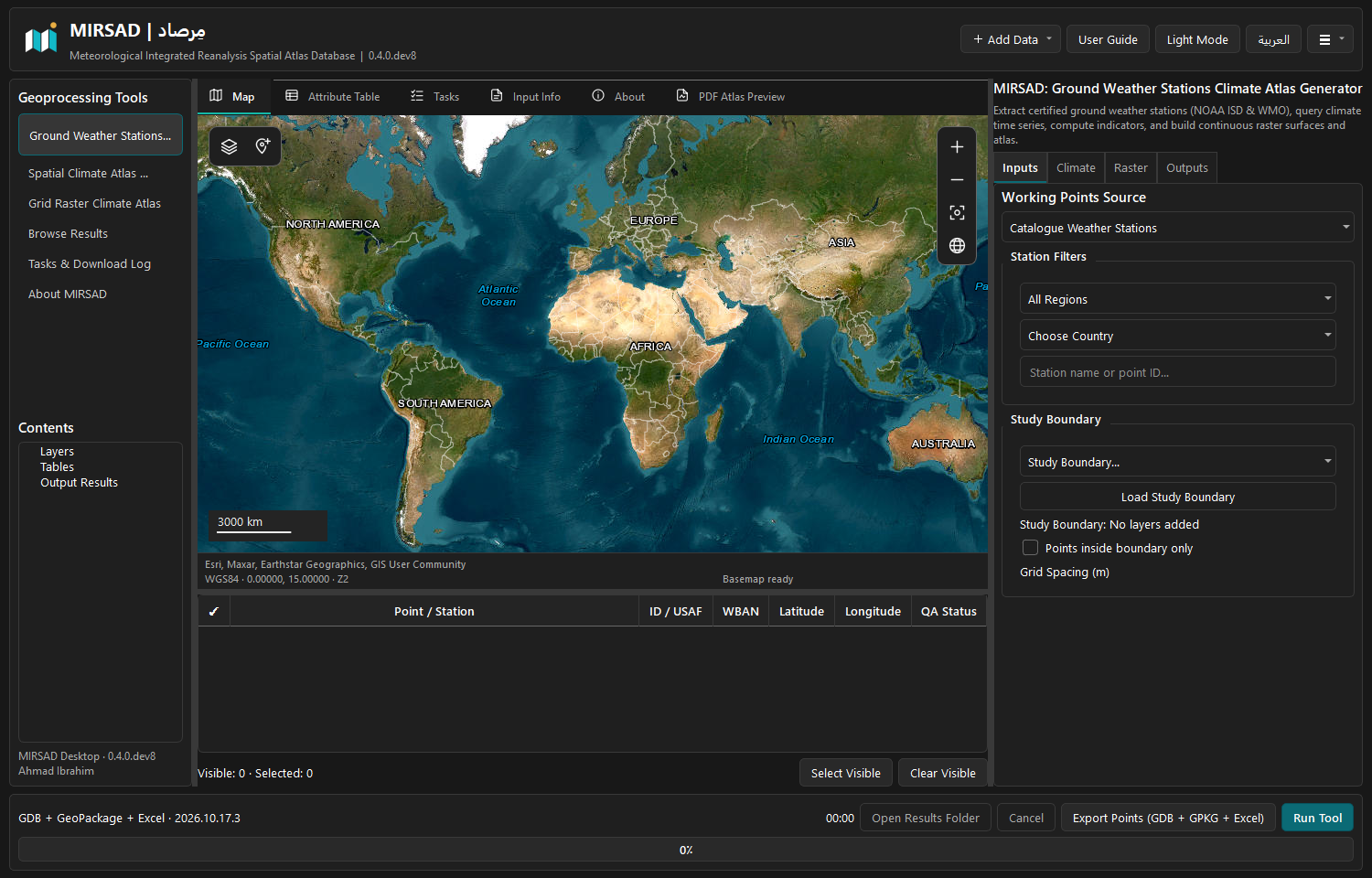
MIRSAD Desktop: map workspace, climate tools and station inputs
لقطة فعلية للتطبيق: الخريطة، الأدوات، المدخلات وجدول المحطات. اضغط للصورة الكاملة.Actual application: map, tools, inputs and station table. Open the image for a full-size view.
سلاسل زمنية · حسابات مناخية · إخراج مكانيTime series · Climate calculations · Spatial outputs
ExcelFileGDBGeoPackageGeoTIFF
19عنصرًا ومجموعة حسابيةClimate calculation modules
28,066سجل موقع في دليل المحطاتStation-location records
45موضوعًا في المساعدة الثنائيةBilingual help topics
521تعريف حقل في المرجع العلميScientific field definitions

تحديث المصدر والشروحات · 22 أكتوبرSource and documentation update · 22 October

إضافات اختيارية وحسابات موثقة.Optional additions, documented calculations.

هذه الإضافات في المصدر الحالي. المثبت المنشور 0.4.0.dev8 يخص نسخة 19 أكتوبر ولا يتضمنها؛ راجع حالة التنفيذ قبل اختيار الحزمة.These additions are in the current source. The published 0.4.0.dev8 installer is the 19 October build and does not include them; check implementation status before choosing a package.

11 متغيرًا إضافيًا وHG / PM11 additional variables and HG / PM

خيارات مغلقة افتراضيًا في Desktop وأداتي النقاط والمحطات. حساب Penman–Monteith يومي مستقل، مع اختيار منفصل لراستر كل طريقة. المسار الإقليمي للإضافات ما زال ضمن المتبقي.Default-off options in Desktop and the point/station toolboxes. Daily Penman–Monteith is independent, with separate raster selection for each method. Regional enrichment remains open.
اليومي والمناسيب والمصدرDaily processing, elevation and provenance

تجميع الساعات المكتملة يوثّق العملية والتغطية في المخرجات. إثراء DEM متاح لنقاط Desktop مع حفظ المنسوب الأصلي وبيان DTM أو DSM؛ إضافته إلى Toolbox لم تكتمل بعد.Complete-hour aggregation records its operation and coverage in outputs. Desktop point DEM enrichment preserves original elevations and declares DTM or DSM; Toolbox DEM is still pending.

Excel كبير وأدلة تحققLarge Excel exports and acceptance evidence

كتابة XLSX تدريجية وتقسيم الأوراق والملفات مع فهرس. نجحت حدود مليون صف وحالات طرق Pro؛ قبول الراستر الأصلي وArcMap واختبار ألف نقطة/30 سنة ما زال مفتوحًا.Streaming XLSX splits sheets and files with an index. Million-row boundaries and Pro method fixtures passed; native raster, ArcMap and the 1,000-point/30-year pipeline acceptance remain open.

اختر مسار عملكChoose your workflow

ثلاث أدوات، ومدخلات واضحة.Three tools. Clear inputs.

تنظيم واحد في المشروع؛ كل أداة لها مدخلاتها ومصادرها. Desktop يتيح المسارات الثلاثة في واجهة مستقلة، وصناديق الأدوات تعمل داخل بيئة ArcGIS المرخصة.Each workflow has its own inputs and source capabilities. Desktop presents all three in an independent workspace; the toolboxes run inside a licensed ArcGIS environment.

دليل صناديق الأدوات ↗Toolbox guide ↗
01 / POINTS

أطلس مناخ النقاطPoint climate atlas

ابدأ بطبقة نقاطك، واختر المصدر والفترة والعناصر. تُستخرج بيانات الشبكات عند المواقع، ثم تُحسب المؤشرات والمخرجات المطلوبة.Start with your point layer, select a source, interval and modules. Sample gridded data at the locations, then calculate the requested indicators and outputs.

ExcelFileGDBGeoPackage
02 / STATIONS

أطلس محطات الأرصادWeather station atlas

اختر الإقليم والدولة ومحطة واحدة أو عدة محطات. نوع البيانات يتبع المصدر: رصد NOAA بالمعرف الصحيح، أو قيم شبكة مناخية في موقع المحطة.Choose a region, country and one or more stations. The source determines the data: NOAA observations with exact station identity, or gridded values at station locations.

NOAA GSODERA5هجين متتابعStaged Hybrid
03 / REGIONAL GRID

أطلس الشبكة والراسترGrid raster climate atlas

حدد منطقة الدراسة للعمل مع NASA POWER أو خلايا CHIRPS وCHELSA الأصلية. يتوفر أيضًا مسار لحقول نقاط محسوبة مسبقًا، مع خيارات الاستيفاء والقص.Define a study area for NASA POWER or native CHIRPS/CHELSA cells. Precomputed point fields are also supported, with interpolation and clipping settings.

GeoTIFFCHIRPSCHELSA
المخرجات وقابلية التتبعOutputs and traceability

جداول Excel، ومخرجات مكانية، وراستر وأطلس حسب الخيارات والمنصة. يظل النقص والأخطاء الجزئية ومصدر القيم واضحًا. مشاركة الحسابات لا تعني اكتمال مطابقة جميع المعاملات والملفات بين Toolbox وDesktop؛ حالة المقارنة موثقة.Excel, spatial outputs, rasters and atlases depend on settings and host. Missing data, partial failures and provenance remain explicit. Shared calculations do not imply complete Toolbox/Desktop parameter or file parity; the comparison status is documented. الحالة الحاليةCurrent status

المصدر قبل المؤشرStart with the source

بيانات مختلفة، واختيار موثّق.Different data. Informed choices.

رصد محطات وإعادة تحليل ومنتجات شبكية يومية أو شهرية. الدليل يوضح التغطية والدقة والعناصر المدعومة لكل منتج، مع بحث وفلاتر بالعربية والإنجليزية.Station observations, reanalysis and daily or monthly grid products. The searchable directory explains coverage, resolution, variables and supported tools in Arabic and English.

NASA POWEROpen-Meteo · ERA5NOAA GSOD / GHCNCopernicus CDSCHIRPSTerraClimateCHELSAMODISNASA IMERG

دقة حسب العنصرResolution per variable

Auto يختار أدق منتج مناسب للعنصر والفترة كاملة داخل المصدر المختار، مع توثيق المنتج المستخدم.Auto selects the finest suitable product per variable and whole interval within the chosen source, with actual-product provenance.

تحميل هجين متتابعSequential Hybrid downloads

NOAA ثم ERA5 ثم NASA للقيم المفقودة، وبعدها استكمال شهري اختياري. هجين النقاط يبدأ من ERA5.NOAA, then ERA5, then NASA for missing cells, followed by optional monthly filling. Point Hybrid starts with ERA5.

متطلبات الحساب واضحةAccount requirements are explicit

CDS وIMERG يحتاجان حساب المستخدم. المساران منفذان، والتحقق بالتنزيل بحساب فعلي ما زال ضمن المتبقي.CDS and IMERG need the user’s account. Both adapters are implemented; live authenticated acceptance remains open.

الحسابات العلميةScientific calculations

العناصر الـ19، كما هي في البرنامج.The 19 modules, as implemented.

تُعرض الأسماء والاعتماديات من سجل Desktop. توافر النتيجة يتطلب دعم المصدر للمدخلات وصلاحية الفترة. تفاصيل المعادلات والوحدات وتفسير الأعمدة في مركز المساعدة.Names and dependencies come from the Desktop registry. Results require supported inputs and valid coverage. The help centre explains equations, units and every output column.

المعادلات وتفسير الأعمدة ↗Equations and field meanings ↗

01

درجة حرارة الهواءTemperature

متوسط الحرارة والعظمى والصغرى والمدى الحراري.Mean, maximum and minimum air temperature and temperature range.

T2MT2M_MAXT2M_MIN
02

درجة حرارة سطح الأرضLand Surface Temperature

حرارة السطح والفرق عن حرارة الهواء؛ ليست رصدًا إضافيًا لحرارة الهواء.Surface temperature and its difference from air temperature; not another air observation.

TST2M
03

الأمطارPrecipitation

مجاميع الفترات المكتملة ومتوسطاتها المناخية؛ المفقود ليس صفرًا.Complete-period totals and their climatological means; missing is not zero.

PRECTOTCORR
04

الضغط عند سطح البحرSea Level Pressure

الضغط المختزل إلى مستوى سطح البحر.Pressure reduced to sea level.

SLP
05

الضغط السطحيSurface Pressure

الضغط عند ارتفاع السطح، منفصلًا عن ضغط مستوى البحر.Pressure at the surface elevation, distinct from sea-level pressure.

PS
06

الرياح: السرعة والاتجاهWind

سرعة الرياح عند 10 أمتار والاتجاه بمتوسط دائري.10 m wind speed and circular-mean wind direction.

WS10MWD10M
07

الرطوبة النسبيةRelative Humidity

ملخصات الرطوبة النسبية بالنسبة المئوية.Relative humidity summaries in percent.

RH2M
08

نقطة الندىDew Point

ملخصات درجة حرارة نقطة الندى.Dew-point temperature summaries.

T2MDEW
09

الإشعاع الشمسيSolar Radiation

متوسط الطاقة اليومية للإشعاع الشمسي وملخصاتها.Mean daily solar energy and its summaries.

ALLSKY_SFC_SW_DWN
10

الأشعة فوق البنفسجيةUV Index

مؤشر الأشعة فوق البنفسجية، مع توضيح تقريب الظهر الموروث لبيانات NASA.UV index with the inherited NASA noon approximation documented.

ALLSKY_SFC_UV_INDEX
11

الغطاء السحابيCloud Cover

متوسط نسبة الغطاء السحابي.Mean cloud-cover fraction.

CLOUD_AMT
12

مؤشر الحرارة والإجهاد الحراريHeat Index

تقدير الإجهاد من الحرارة والرطوبة؛ نواتج WBGT تقريبية وليست قياس جهاز.Heat/humidity stress estimates; WBGT outputs are approximate, not instrument readings.

T2MRH2M
13

برودة الرياح والإجهاد الباردWind Chill

برودة الرياح ضمن مجال تطبيق المعادلة.Wind chill within the formula’s domain.

T2MWS10M
14

الجفاف: دي مارتونDe Martonne Aridity

مؤشر دي مارتون من المطر وحرارة الهواء.De Martonne aridity from rainfall and air temperature.

T2MPRECTOTCORR
15

البخر والنتحEvapotranspiration

Hargreaves هو الافتراضي من الحرارة ودائرة العرض. المصدر الحالي يتيح أيضًا Penman–Monteith يوميًا عند اكتمال مدخلاته، كحساب مستقل في Desktop والنقاط والمحطات.Hargreaves is the default, from temperature and latitude. Current source also offers independent daily Penman–Monteith in Desktop and point/station tools when its inputs are complete.

T2MT2M_MAXT2M_MIN
16

الجفاف: UNEPUNEP Aridity

نسبة المطر إلى البخر والنتح المحتمل، عند اكتمال المدخلات.Precipitation / potential evapotranspiration when inputs are valid.

T2MT2M_MAXT2M_MINPRECTOTCORR
17

العجز المائيWater Deficit

العجز المائي وفق المطر والبخر والنتح في المحرك.Water deficit from the kernel’s rainfall/PET calculations.

T2MT2M_MAXT2M_MINPRECTOTCORR
18

عدد الأشهر الجافةDry Months

عدد الأشهر الجافة وفق مقارنة المطر بالحرارة.Dry-month count from precipitation and temperature.

T2MPRECTOTCORR
19

الاتجاهات والشذوذ عن خط الأساسTrends & Anomalies

اتجاهات الحرارة والمطر والشذوذ عن خط الأساس، عند كفاية السنوات.Temperature/rainfall trends and baseline anomalies when enough years are available.

T2MPRECTOTCORR

ابدأ من هناGet started

طريقتان لتشغيل مرصاد.Two ways to run MIRSAD.

MIRSAD Desktop Windows x64

  1. نزّل مثبت التطويرDownload the preview installer

    راجع تفاصيل الإصدار وبصمة SHA-256. هذه نسخة تطوير، وليست إصدار stable معتمدًا.Read release details and SHA-256 checksums. This is a development preview, not an approved stable release.

  2. ثبّت التطبيق وافتحهInstall and launch

    التبعيات ودليل المحطات والمساعدة مرفقة؛ لا تحتاج ArcGIS أو Python منفصلًا.Dependencies, station catalogue and help are bundled; no ArcGIS or separate Python is required.

  3. اختر الأداة ومدخلاتهاChoose a tool and its inputs

    حدد المصدر والفترة والعناصر ومسار الإخراج. حفظ المشروعات خارج مجلد التثبيت يحافظ على فصل العمل عن التطبيق.Set source, interval, modules and output directory. Keep user projects outside the installation folder.

ArcGIS Pro / ArcMap

  1. نزّل المستودع كاملًاDownload the whole repository

    فك الحزمة مع الحفاظ على هيكل المجلدات؛ ملفات التول بوكس تعتمد على الملفات المساعدة المجاورة.Extract and preserve the directory structure; toolboxes depend on sibling support resources.

  2. أضف التول بوكس من مجلد ToolboxesAdd a toolbox from Toolboxes/

    من Catalog أو ArcToolbox اختر ملف النقاط أو المحطات أو الشبكة الإقليمية.In Catalog or ArcToolbox, choose the point, station or regional grid toolbox.

  3. راجع متطلبات بيئة ArcGISCheck the ArcGIS environment

    المسارات تراعي Python 2.7 و3؛ الأدوات المكانية قد تحتاج الترخيص المناسب. تحقق المعاملات في Pro لا يعادل اختبار المعالجة الأصلي في ArcMap.Compatibility paths preserve Python 2.7 and 3; spatial operations can require the appropriate license. Pro parameter checks do not establish native ArcMap processing acceptance.

ملفات مباشرة، وروابط حاليةDirect downloads. Current links.

التنزيل ومركز المساعدة.Downloads and help.

مثبت التطوير مستقل عن حزمة مصدر ArcGIS. الدليل يعمل في المتصفح، ومساعدة CHM متاحة للتنزيل باللغتين.The preview installer is separate from the ArcGIS source package. Browse the guide online or download either language’s CHM.

DESKTOP / 0.4.0.dev8

مثبت Windows x64Windows x64 installer

نسخة التطوير المنشورة، بحجم 149 ميجابايت تقريبًا. بصمتها وحالة الاختبارات وحدود القبول موثقة مع الإصدار.The published development preview, approximately 149 MB. Checksums, validation scope and remaining acceptance are recorded with the release.

ARCGIS / SOURCE

صناديق الأدوات والكود المصدريToolboxes and source code

الحزمة الكاملة تضم صناديق الأدوات الثلاثة، والمحرك المشترك، ومصدر Desktop، والأصول والتوثيق. احتفظ بالمجلدات معًا.The complete package includes all three toolboxes, shared core, Desktop source, assets and documentation. Keep the directories together.

HELP / AR + EN

الدليل والمعادلات وتفسير الأعمدةGuide, equations and field meanings

45 موضوعًا تشرح الأدوات والمدخلات والمصادر والمعادلات. يشمل المرجع معنى كل عمود وفترته ووحدته وأمثلة حسابية.45 topics covering tools, inputs, sources and formulas. The reference explains each field’s meaning, period and unit, with worked examples.

REFERENCE / DATA

قواميس الحقول وأدلة البياناتField dictionaries and data references

تطابق الدليل لا يثبت دقة محطة ميدانيًا. راجع حالة الجودة ومصدر السجل.Catalogue agreement is not field verification. Inspect quality status and record provenance.

مجتمع مرصاد · اختبر وناقش وساهمMIRSAD Community · Test, discuss & contribute

تجربتك هي الخطوة التالية في تطوير مرصاد.Help shape the next version of MIRSAD.

ندعو الباحثين والطلاب ومتخصصي المناخ والأرصاد والهيدرولوجيا ونظم المعلومات الجغرافية لتجربة مرصاد ومشاركة ما نجح وما يحتاج تحسينًا. كل الملاحظات مرحّب بها، بما فيها المشكلات والانتقادات البنّاءة، ولا تحتاج معرفة بالبرمجة للمشاركة.Researchers, students, climatologists, meteorologists, hydrologists and GIS professionals are invited to test MIRSAD and share what works and what needs improvement. Critical feedback is welcome, and programming experience is not required.

01 / DISCUSS

شارك رأيك وناقش النتائجJoin the community discussion

اعرض تجربتك أو اسأل الباحثين عن مصادر المناخ والمؤشرات والخرائط. تقدر تكتب تعليقًا أو تبدأ موضوعًا جديدًا داخل Discussions.Share your experience, ask questions about climate sources, calculations or maps, and join an existing conversation or start a discussion.

02 / REPORT

واجهت خطأ؟ ساعدنا نصلحهFound a bug? Help us fix it

بلّغ عن مشكلة في التنزيل أو الحسابات أو Excel أو GIS، مع اسم الأداة والإصدار وخطوات ظهور المشكلة، من خلال نموذج مخصص وسهل.Report issues in downloads, calculations, Excel or GIS, with the tool, version and steps to reproduce using a structured issue form.

03 / IMPROVE

اقترح مصادر وأدوات جديدةSuggest a feature or data source

اقترح مؤشرًا مناخيًا، أو مصدر بيانات، أو تحسينًا في الواجهة أو إخراج النتائج. ويمكنك أيضًا المساهمة بتصحيح علمي أو تطوير برمجي.Suggest a climate indicator, data provider, interface improvement or export feature. Scientific corrections and code contributions are welcome too.

المشاركة عبر GitHub تتطلب حسابًا مجانيًا. لا تُرفق كلمات مرور أو بيانات شخصية أو مفاتيح خدمات. تطبيق Desktop لا يزال نسخة تطوير.A free GitHub account is required to participate. Never share passwords, personal data or API keys. MIRSAD Desktop is still in development.

مشروع مفتوح للمساهمةOpen to contributions

طوّر معنا، وابدأ من سجل واضح.Build on a documented foundation.

الكود متاح بترخيص MIT. ملفات AGENTS توثق تاريخ التطوير والقرارات والعقود، والحالة الحالية تفصل المنفذ عن المتبقي.Source is available under MIT. AGENTS files record development history, decisions and contracts; current status separates implementation from remaining acceptance.

01 / READ

اقرأ دليل المساهمةRead the contributor guide

افهم هيكل المشروع وحفظ بيانات المستخدم وحدود الاختبارات قبل التغيير.Understand repository layout, user-data preservation and test boundaries before changing code.

02 / VERIFY

راجع المنهجيةReview the methodology

المعادلات والاعتماديات والوحدات والتغطية تحتاج أدلة متوقعة مستقلة؛ محاكاة ArcPy لا تعادل التشغيل الأصلي.Equations, dependencies, units and coverage need independent expected values; ArcPy doubles are not native execution.

03 / CONTRIBUTE

شارك إصلاحًا أو فكرةShare a fix or an idea

افتح بلاغًا أو طلب دمج مع خطوات إعادة المشكلة والتحقق المرتبط بالتعديل.Open an issue or pull request with reproducible steps and evidence for the change.

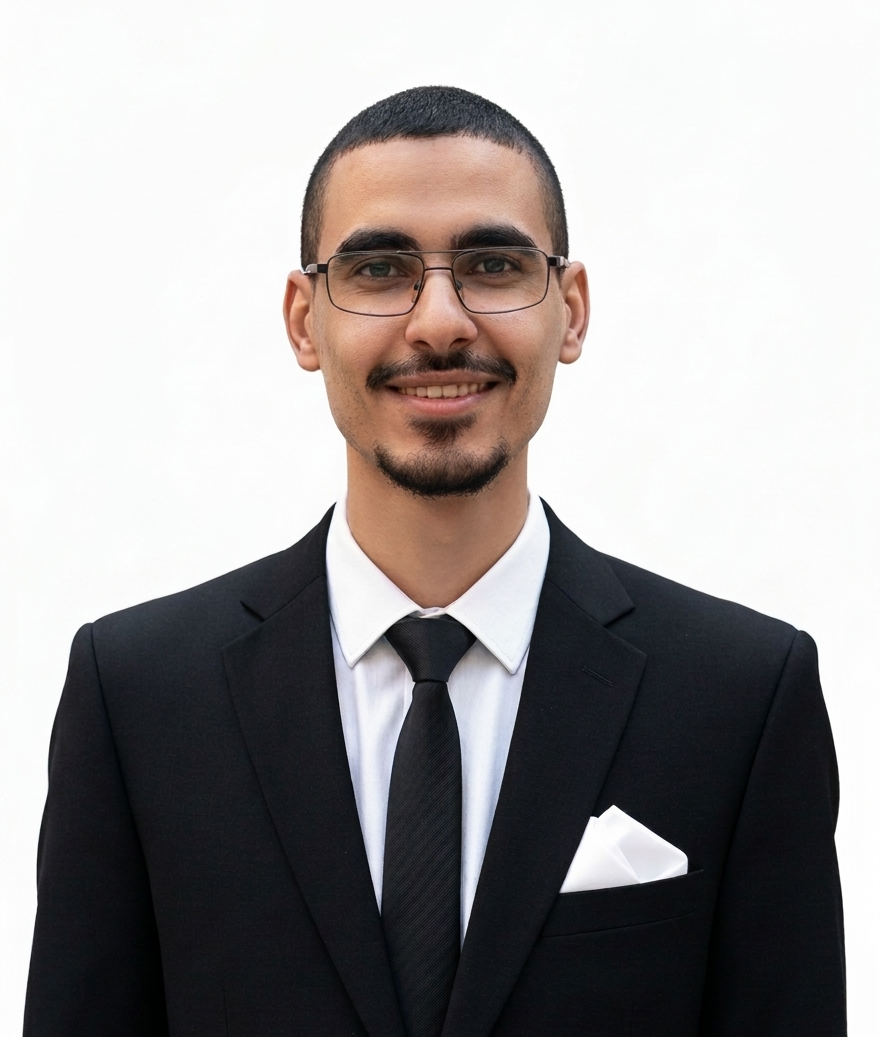
أحمد إبراهيم — Ahmad Ibrahim

أخصائي نظم معلومات جغرافية وكارتوجرافيGIS specialist & cartographer

@ahmadibrahim4geo

وراء منظومة مرصادBehind MIRSAD

أحمد إبراهيمAhmad Ibrahim

المطور الرئيسي والكارتوجرافيLead developer & cartographer

أخصائي نظم معلومات جغرافية (GIS) وكارتوجرافي ومطور برمجيات مكانية. يوظف البرمجة المتقدمة وحلول الذكاء الاصطناعي لتطوير منظومة مِرصاد (MIRSAD) كحل رقمي مؤتمت لمعالجة واستيفاء البيانات المناخية، وتمكين الباحثين والجامعات في جمهورية مصر العربية والوطن العربي من أدوات التحليل والنمذجة الكارتوجرافية.GIS specialist, cartographer and spatial software developer. He brings programming and AI-assisted development to MIRSAD, an automated platform for climate data processing and spatial interpolation, supporting researchers and universities in Egypt and the Arab region with tools for analysis and cartographic modelling.

استشارات الدراسات الهيدرولوجية والبنية التحتيةHydrology & infrastructure consulting

للاستشارات في الدراسات الهيدرولوجية ودرء أخطار السيول، وشبكات تصريف الأمطار، وحلول تخفيض المياه الجوفية، وشبكات المرافق والبنية التحتية.Consulting for hydrological studies, flood risk, stormwater drainage, groundwater lowering, utilities and infrastructure networks.

تواصل عبر واتسابChat on WhatsApp